Most professionals spend their Tuesday mornings doing exactly what they did on Monday: sitting through the same meeting, only this time, they’re doing it via a transcript. We have the technology to record everything, but we’ve created a new problem. We now have 5,000-word documents full of tangents, “ums,” and “can you hear me now?” that need to be turned into a professional action plan. If you are a consultant or manager, this manual translation is a high-friction task that kills project momentum.
What Notion AI actually is
Notion AI isn’t just a chatbot living in a sidebar. It is a functional layer built into the workspace you likely already use for your documentation. For meeting management, it focuses on context-aware extraction. It doesn’t just look for keywords; it understands the flow of a professional conversation to distinguish between a casual suggestion and a formal commitment. This allows it to pull structured data out of the most unstructured transcripts.
Setting it up — four steps
To turn your transcript into an action plan, follow this workflow:
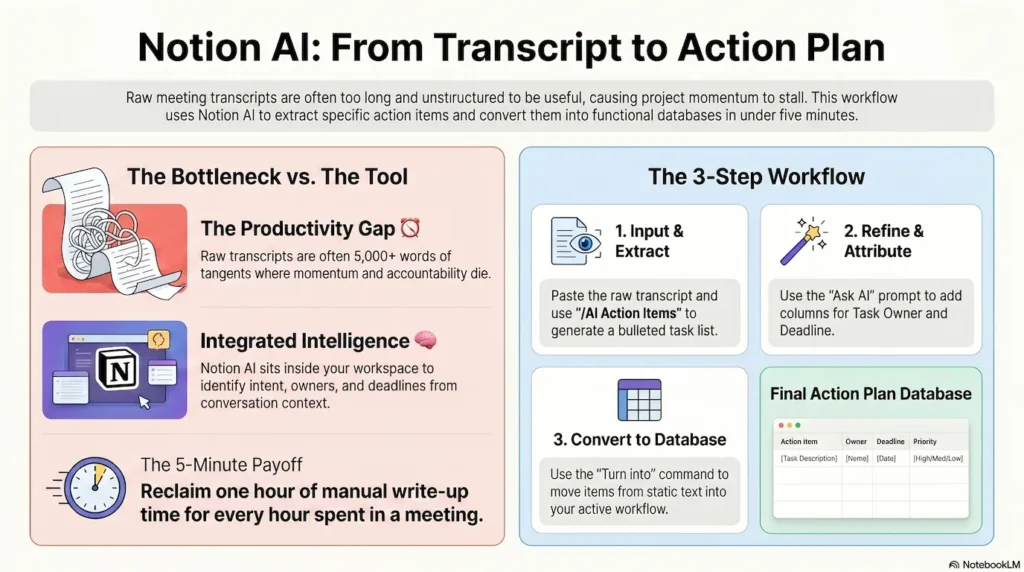
1. The Import: Paste your raw transcript from Teams, Zoom, or your recording app directly into a Notion page.
2. The Extraction: Type /AI and select ‘Find Action Items’. Notion will generate a bulleted list of every task mentioned.
3. The Refinement: Highlight that list and select ‘Ask AI’. Use the prompt: “Format this as a table with columns for Task, Owner, and Deadline.”
4. The Integration: Use the ‘Turn into’ command on the table to convert it into a ‘Database’. This moves the tasks from a static list into your active project tracker.
The Action Plan Template
To get the most professional result, use this specific prompt within an AI block immediately following your transcript:
PASTE START
“Review the transcript above. Extract every specific commitment and task. Create a table with the following headers: Action Item, Assigned To, Deadline, and Status. Ensure the language is direct and professional. Remove all conversational filler.”
PASTE END
What makes it work well
The quality of your output depends on the clarity of the “ask.” When using Notion AI, treat it like a highly capable junior project coordinator. If you ask for a “summary,” you will get a vague paragraph. If you ask for “actionable deliverables with owners,” you get a tool your team can actually use. Always perform a quick sense-check to ensure that a nuanced point—such as a specific budget constraint—has been captured correctly.
The practical payoff
When you automate the transcription-to-action-plan pipeline, you reclaim the hours usually lost to administrative drift. For a mid-career professional, this isn’t about the novelty of AI; it’s about the speed of execution. You can finish a client workshop at 10:00 AM and have the structured next-steps list in their inbox by 10:05 AM. That is how you maintain professional authority and keep projects moving.