
If you use Claude regularly for work, there is a good chance you are wasting the first few minutes of every session explaining yourself. Your role. Your project. What tone you want. What matters right now. Claude has no memory between conversations by default — so every session starts cold.
Claude Projects fixes that.
Projects is a feature inside Claude.ai that gives Claude a persistent context for a specific area of your work. Set it up once and every conversation inside that Project starts already knowing who you are and what you need.
Here is how to set one up.
What Claude Projects actually is
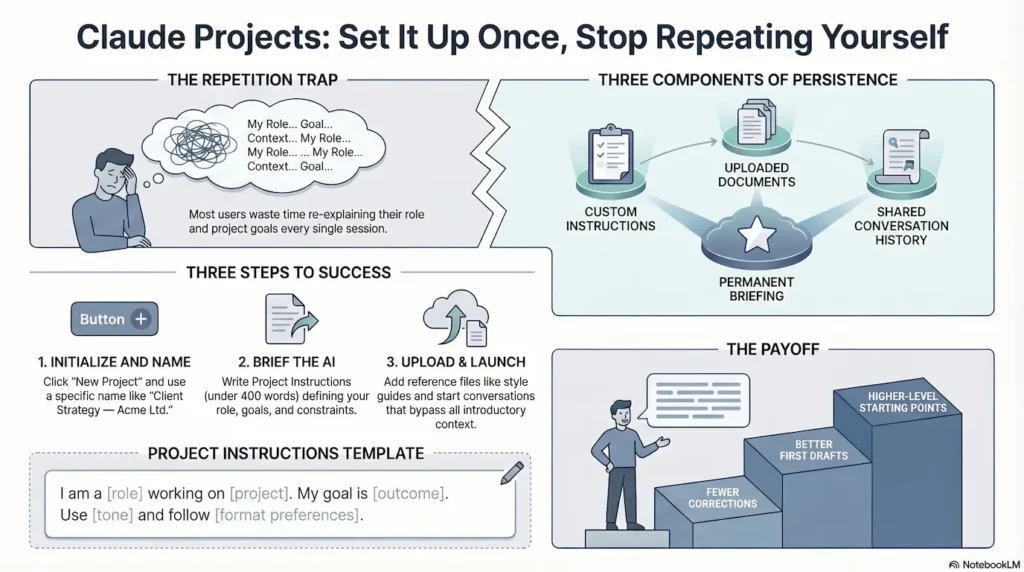
A Project is a dedicated workspace inside Claude.ai. Inside it, you store three things:
- Project Instructions — a written briefing that Claude reads before every conversation in the Project
- Uploaded documents — files Claude can reference in any conversation inside the Project
- Conversation history — every chat you have inside the Project stays there and contributes to context
The result is that Claude always starts with your context loaded. You skip the setup and get straight to the work.
Setting it up — five steps
Step 1. Open Claude.ai. Find Projects in the left sidebar and click New Project.
Step 2. Name it clearly. Use a client name, an engagement name, or a subject area. Examples: Client Strategy — Acme Ltd. Quarterly Reporting. My Writing Projects.
Step 3. Write your Project Instructions. This is the most important step. Write them as if you are briefing a capable contractor starting work with you today. Include your role, what you are working on, the tone you want, and any key constraints. Keep it under 400 words and be specific.
Step 4. Upload relevant documents. Strategy docs, style guides, project briefs, key references — anything Claude should always have access to.
Step 5. Start a conversation inside the Project and notice the difference. No preamble needed. Go straight to the task.
A Project Instructions template to start with
Copy and adapt this as your starting point:
I am a [role] working on [project or engagement name]. My main goal with this Project is [outcome]. I want you to [tone guidance]. Key things to know: [2-3 specific context points]. When drafting, default to [format preference]. Flag uncertainty rather than guessing.
What makes good Project Instructions
Three principles that make a real difference:
- Specific beats vague. ‘Senior business analyst working on a membership platform for an Australian education organisation’ is far more useful than ‘analyst’.
- Include your output preferences. Always want bullet points? Say so. Prefer plain prose? Say that. Want Claude to push back on your thinking? Say that too.
- Keep it updated. As the project evolves, update the instructions. Two minutes of maintenance keeps Claude calibrated.
The practical payoff
Once a Project is set up well, every conversation inside it starts at a higher level. You get better first drafts, fewer corrections, and no time spent on context that Claude should already know.
The first setup takes about fifteen minutes. After that, it runs quietly in the background every time you open Claude.
One Project per context. One briefing. No more repeating yourself.