Zero To AI Episode 15: Document Your AI Stack (And Make It Shareable)
Your AI Stack
You’ve been using AI for fifteen weeks. You’ve developed specific workflows. You’ve figured out which tools work for what. You’ve built your own approach.
But here’s the question: could you explain your system to someone else?
If a colleague walked up to you tomorrow and said, “Hey, I know you’re good with AI — can you show me how you actually use it?” could you hand them something? Not just talk about it. Actually give them documentation that shows your system.
This week, you’re going to create that: your AI stack documentation. A shareable guide showing how you work with AI.
The Reality Check
Here’s what most people do with AI. They use it. They get results. They know it’s helping. But if you asked them to write down their system? They’d struggle.
Because they don’t have a system. They have habits. Random tool use that’s grown organically over time. Which is fine for you personally — but it’s not shareable. It’s not teachable. It’s not portfolio-worthy.
This week, you’re turning those habits into a documented system. Not because you need to change what you’re doing, but because you need to be able to explain it.
Here’s what happens when you document your system:
You clarify your own thinking. Writing it down forces you to be specific. “I use Claude for analysis” becomes “I use Claude when I need to synthesize information from multiple sources because it’s better at finding patterns across disparate data.” That’s clearer. That’s more useful.
You create something shareable. When someone asks for help, you have an answer. Not “uh, I just kind of use ChatGPT for stuff.” You have a guide. “Here’s how I work. Here’s when I use what. Here’s an example.”
You prove you’re systematic. Anyone can use tools randomly. Having a documented approach shows you’ve thought deeply about this. You’re professional. You’re organized. That matters.
What AI Stack Documentation Actually Proves
Good stack documentation shows four things that most people can’t demonstrate.
You have a coherent system, not random tool use. There’s a difference between “I use whatever AI tool I remember” and “I use Perplexity for research, Claude for synthesis, and ChatGPT for drafting, because each one’s optimised for different cognitive tasks.” One is random. The other is systematic. Documentation proves you’re systematic.
You can teach others. This is a valuable skill. If you can explain your approach clearly enough that someone else can replicate it, you’re not just a user — you’re an expert who can transfer knowledge. Organisations value that.
You’ve thought deeply about your approach. Most people use AI on autopilot. Documentation forces reflection. Why do you use this tool for this task? What’s your quality control process? What have you learned that you’d tell someone just starting? Those questions matter. They show depth.
You’re professional and organised. Having a documented system signals competence. It says: “I don’t just wing it. I have methods. I have standards. I know what I’m doing.” That’s portfolio-worthy.
What to Document
So what actually goes into AI stack documentation?
- Tools You Actually Use Consistently
Not every tool you’ve ever touched. Not the tools you tried once and abandoned. The three to seven tools you use regularly — daily tools, weekly tools, maybe one or two specialty tools for specific situations. That’s it.
- When You Use Each Tool and Why
This is the key part. “I use ChatGPT” is useless. “I use ChatGPT for first drafts of client emails because it’s fast and gets the tone right ninety percent of the time” is useful. Specificity matters.
- Your Workflows for Different Types of Work
How do you do research? How do you write reports? How do you analyse data? Pick two or three common workflows and document them step by step, with examples.
- Integration Points Between Tools
How do your tools work together? “I use Perplexity to gather sources, then paste the key findings into Claude for synthesis, then use that synthesis as the foundation for ChatGPT to draft the final report.” That’s a system. That’s integration.
- Quality Control Methods
How do you make sure AI outputs are good? Do you always fact-check research? Do you run drafts through a grammar tool? Do you have a checklist for AI-generated content? Document your quality process.
- Lessons Learned
What works? What doesn’t? What would you tell someone starting out? This is the most valuable part. Your documented experience.
Not a Tool List — A System
Here’s what separates good documentation from bad.
Bad documentation is a list. “Tools I use: ChatGPT, Claude, Perplexity, Midjourney, Canva.” That tells you nothing about how someone actually works.
Good documentation is a system. It shows decision-making.
Daily tools versus weekly tools versus specialty tools: “I use ChatGPT daily for drafting and quick questions. I use Claude two to three times a week when I need deep analysis or synthesis. I use Perplexity weekly for research projects.” That’s useful. That shows how you think.
Specific use cases with examples: Not “I use Claude for analysis.” Instead: “I use Claude for stakeholder analysis. For example, last month I had a complex project with fifteen stakeholders. I gave Claude the background, asked it to map relationships and identify potential resistance points. It surfaced three concerns I hadn’t considered.” That’s concrete. That’s real.
Decision criteria: When do you use what? “If I need speed and the task is straightforward, ChatGPT. If I need nuance and the task is complex, Claude. If I need current information, Perplexity.” That’s your decision logic documented.
Your unique approach: What makes your system yours? Maybe you always start research with Perplexity and finish with Claude. Maybe you have a three-step review process for AI drafts. Maybe you’ve developed specific prompts for recurring tasks. Document what makes your approach distinctive.
Why This Matters Beyond This Week
Let’s be direct about what you’re actually creating here.
It’s a portfolio piece showing expertise. When you’re in a job interview and they ask “How do you use AI?”, most candidates say something vague. You pull out your stack documentation. “Here’s my system. Three-page guide. Shows my tools, my workflows, my quality process. Would you like to see it?” That’s different.
It’s shareable with colleagues who ask for help. You will get asked. “Hey, you’re good with AI — can you show me how you use it?” Instead of trying to explain on the spot, you send them your guide. “Start with page one. Try the workflow on page two. Let me know if you have questions.” That’s leverage.
It’s evidence of systematic thinking. Anyone can use tools. Not everyone can document a coherent system. This shows you think methodically, you’re organised, and you can transfer knowledge. Those are professional skills.
It’s a foundation for teaching others. This documentation becomes your teaching material. You’ve already done the work. You just hand it out.
It’s interview conversation material. Interviewers love concrete examples. “Walk me through how you approach a complex research task.” You’ve got documentation. You can literally show them. That’s memorable.
Common Failure Points
Before you start, here’s where people typically go wrong.
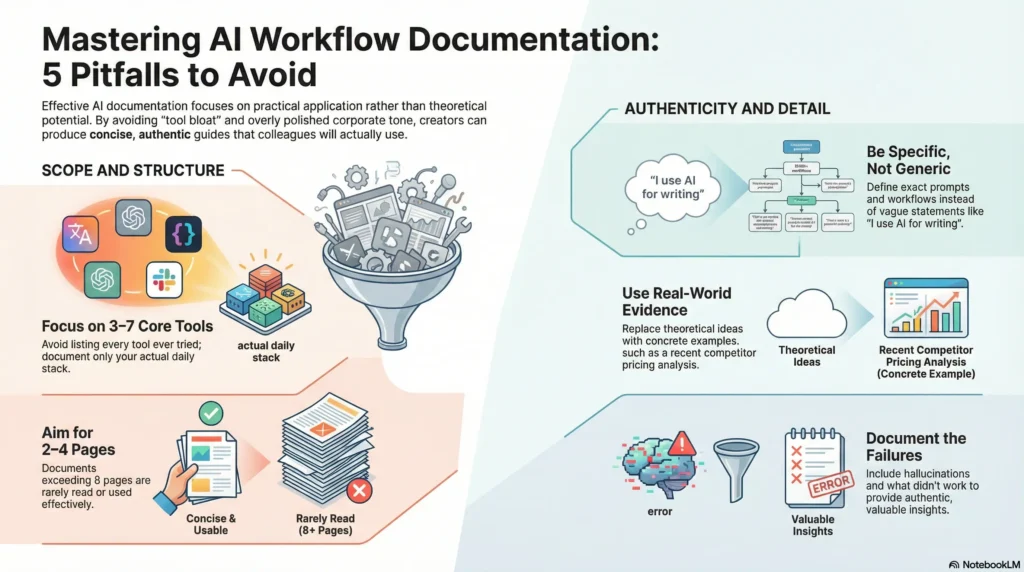
Listing every tool they’ve ever touched. “I’ve used ChatGPT, Claude, Perplexity, Midjourney, Stable Diffusion, Runway, ElevenLabs, Notion AI, Jasper, Copy.ai…” Stop. No one cares about tools you tried once. Document the three to seven tools you actually use. That’s your stack.
Generic descriptions. “I use ChatGPT for writing.” Cool. So does everyone. What specifically do you write? How do you prompt it? What’s your workflow? What do you do when it gets stuck? Be specific.
Making it too long. No one reads twenty pages. Aim for two to four pages for most use cases. If you’re going ambitious, five to eight pages maximum. Longer than that and no one will actually use it.
All polish, no authenticity. Some people write stack documentation like it’s a corporate brochure — perfect, polished, zero personality. Don’t do that. Include what didn’t work. Include what you’re still figuring out. Include honest observations. “I tried using AI for X but it kept hallucinating, so I stopped.” That’s valuable. That’s real.
No concrete examples from real work. Everything’s theoretical. “I could use Claude for analysis.” Did you? Show me. “Last week I analysed competitor pricing using Claude. Here’s how I did it.” Examples make it real.
The Three Levels: Choose Your Own Scope
There’s no single right way to do this. Choose the level that fits your time and what you actually need.
Minimum Level — 60 Minutes
Create a simple two-page guide. List your daily AI tools (three to five tools maximum) with one sentence each explaining what you use them for. Then document one workflow example showing three to four steps of how you use AI for a common task. Keep it practical. Keep it honest. Sixty minutes, and you’ve got shareable documentation.
Standard Level — 2 Hours
Create a three to four page AI stack guide. Document your tools, your use cases, and two to three standard workflows. Include sections on what tools you use and when, how they work together, your quality control approach, and key lessons learned. Make it shareable as a Google Doc or PDF. Include real examples from your actual work.
Ambitious Level — 5 Hours
Create comprehensive five to eight page documentation covering your complete AI operating system. Detailed tool breakdown. Multiple workflows for different work types. Integration points. Quality assurance methods. Case examples. Lessons learned. Common pitfalls. Format it professionally as a PDF or in Notion. Add visual elements if helpful — workflow diagrams, screenshots, examples. Make it good enough to share publicly or use in job applications.
All three levels are legitimate. Choose based on your time and what you need.
Your Action Plan This Week
Here’s what to do:
- Download your chosen guide at zerotoai.co.nz/week-15 — Minimum, Standard, or Ambitious.
- Document your system. Be honest about what you actually use. Be specific about when and why. Include real examples.
- Make it shareable. Format it as a PDF or Google Doc — something you can actually send to someone when they ask for help.
- Add it to your portfolio folder. This sits next to your signature project and your efficiency audit. You’re building a collection.
Building Your Evidence Portfolio
This is your third piece of evidence.
Week 13, you built something impressive. Week 14, you measured your productivity gains. Week 15, you document your system.
By the end of this week, when someone asks “How do you use AI?” — you have an answer. Not vague. Not generic. Documented. Specific. Shareable.
Next week in Week 16, you’ll be solving someone else’s problem: using AI to help a colleague, a client, or someone in your network — and getting a testimonial. External validation that your skills actually work.
But right now, focus on Week 15. Pick your level. Download your guide. Document your system. Make it shareable. Make it useful. Make it yours.